 Live Preview
← All Templates
SaaS
Revenue — Free SaaS Template for Framer
Revenue is a free 2-page AI SaaS Framer template for revenue analytics landings with Home and Privacy Policy. Skip it if you need Pricing sections and Terms as separate routes.
freesaasaianalyticsfintechrevenue
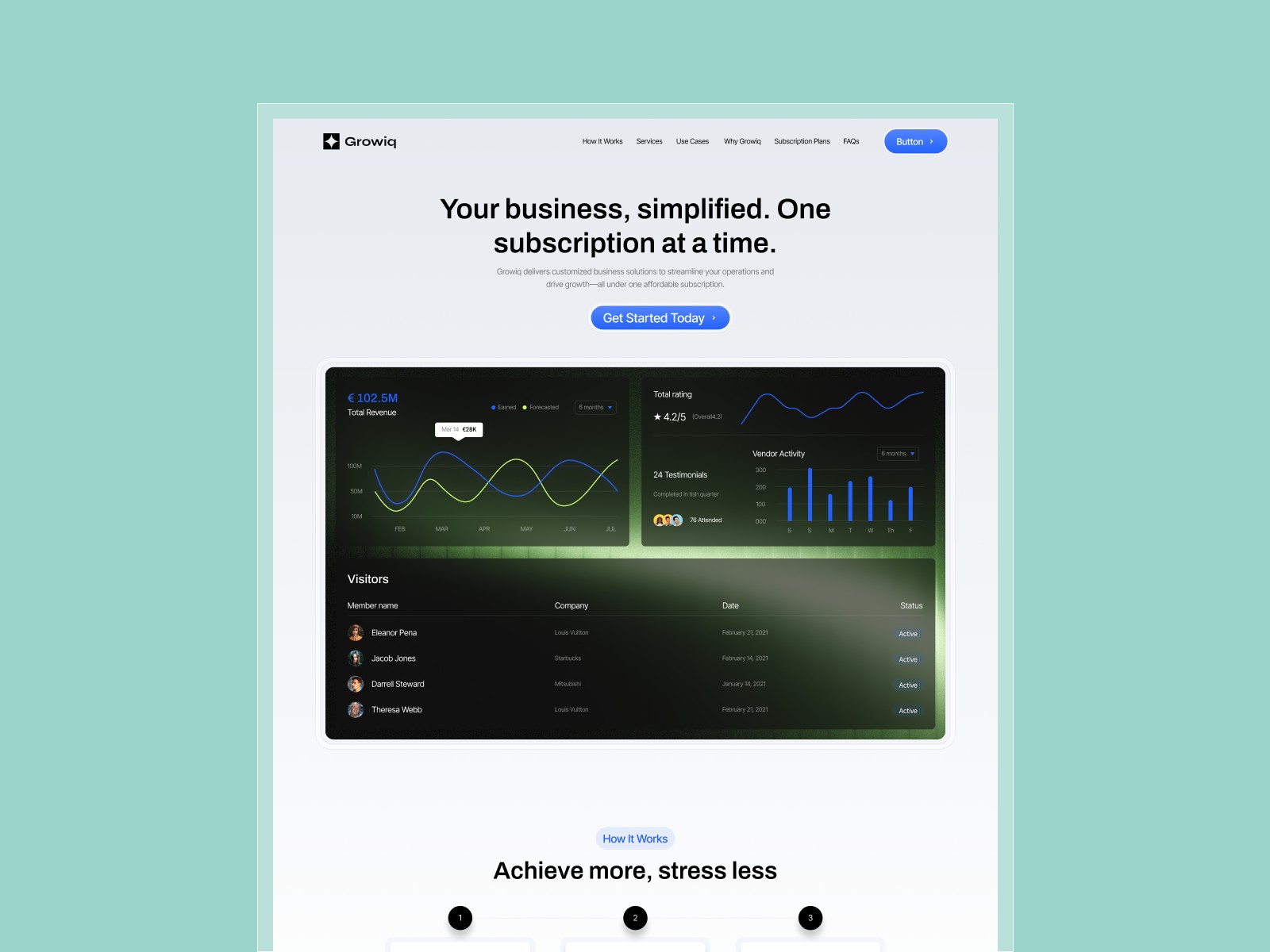
Revenue is a free two-page SaaS Framer template from Unknown (Marafurqaan on Framer) aimed at AI revenue analytics and fintech-style positioning: a dashboard-forward Home plus Privacy Policy, with no CMS and no Terms route in the listing. It suits founders who need charts and metric cards on the marketing site before the product UI is filmed. Skip it if launch week requires pricing tiers, FAQ, and multiple legal URLs beyond Privacy. Growiq packs pricing and FAQ on a one-page SaaS scroll. More free Framer templates sit on the hub, or open the one-page shortlist.
Who should remix Revenue?
Revenue fits a pre-seed AI team pitching automated revenue reporting to finance ops leads. You have Figma dashboards or fake data cards and need a landing that feels like the app, not a generic agency homepage. Two pages keeps legal happy with Privacy while you keep all conversion copy on Home. Hackathon winners turning a demo into a waitlist also benefit from the tiny map.
Walk away if your checklist already lists Features, Pricing, Blog, and Contact as separate nav items. That is Intellora or a nine-page SaaS kit. Walk away if EU launch requires Terms and Cookies as standalone routes before tracking goes live. Syncflow ships a legal trio beside Home.
What Revenue looks like
The revenue-template.framer.website demo leans vivid product UI: chart cards, KPI tiles, and gradient accents that make an analytics tool feel shipped even when the backend is stubbed. Typography and spacing follow contemporary AI SaaS patterns closer to a finance dashboard marketing clone than to a quiet editorial brand.
Motion highlights metric reveals without burying headline clarity on small screens. The honest fight is sitemap size. Everything must convert on Home, and there is no dedicated Pricing frame. Plan pricing sections inside the scroll or add pages after remix.
Pages included in Revenue
Two pages, named as Framer lists them:
- Home: revenue analytics story, dashboard-style proof, and signup or waitlist CTAs
- Privacy Policy: privacy stub for counsel to replace before you collect emails
There is no Terms, Cookies, Contact, or Blog route in the marketplace list. Duplicate Home sections or add routes when compliance and support need their own URLs.
What is distinctive about Revenue
- Two-page AI analytics landing. Minimal map for pre-product finance SaaS pitches.
- Dashboard-style hero and proof blocks. Sells revenue intelligence before real data connects.
- Privacy Policy included. One legal URL without a full compliance sitemap.
- Fintech and AI category fit. Matches marketplace positioning for revenue tooling.
- Static frames only. No CMS tax while you validate positioning.
Built-in breakpoints and forms are Framer defaults. They are not Revenue-specific reasons to remix.
When to remix Revenue, and when to skip
Remix Revenue when you need a free AI revenue analytics landing with Privacy Policy live and every persuasive block on Home. Marafurqaan keeps the file intentionally small for demo-to-waitlist sprints.
Skip it when Pricing, Features, and Blog must be separate routes at launch. Start with Growiq or Intellora. Compare the SaaS shortlist, the one-page shortlist, or return to free Framer templates on the hub.
Frequently Asked Questions
Quick answers about Revenue, including pricing, CMS support, responsiveness, and who it is built for.
-
What kind of product is Revenue best for?
- Revenue fits AI and SaaS teams selling revenue analytics, forecasting, or finance ops tools from a single marketing Home plus Privacy Policy. It is a free 2-page static file. Founders who need pricing blocks and FAQ on the same scroll should remix Growiq instead.
-
Is Revenue free to remix?
- Yes. Revenue is a free Framer template. Remix at no charge; domains follow Framer hosting plans. yoframer documents the listing but does not charge for access.
-
Does Revenue include a CMS?
- No. Only Home and Privacy Policy appear in the marketplace sitemap. Add Terms, Blog, or collections after remix if your launch checklist grows.
-
When should I skip Revenue?
- Skip Revenue if you need Features, Pricing, and Blog as separate URLs. Try Growiq or Intellora , the one-page shortlist , or [free Framer templates](/) on the hub.
Featured in our SaaS roundup
10 Best Free SaaS Framer Templates in 2026
Most free SaaS templates on Framer look great in the preview and fall apart the moment you customize them. These 10 don't.