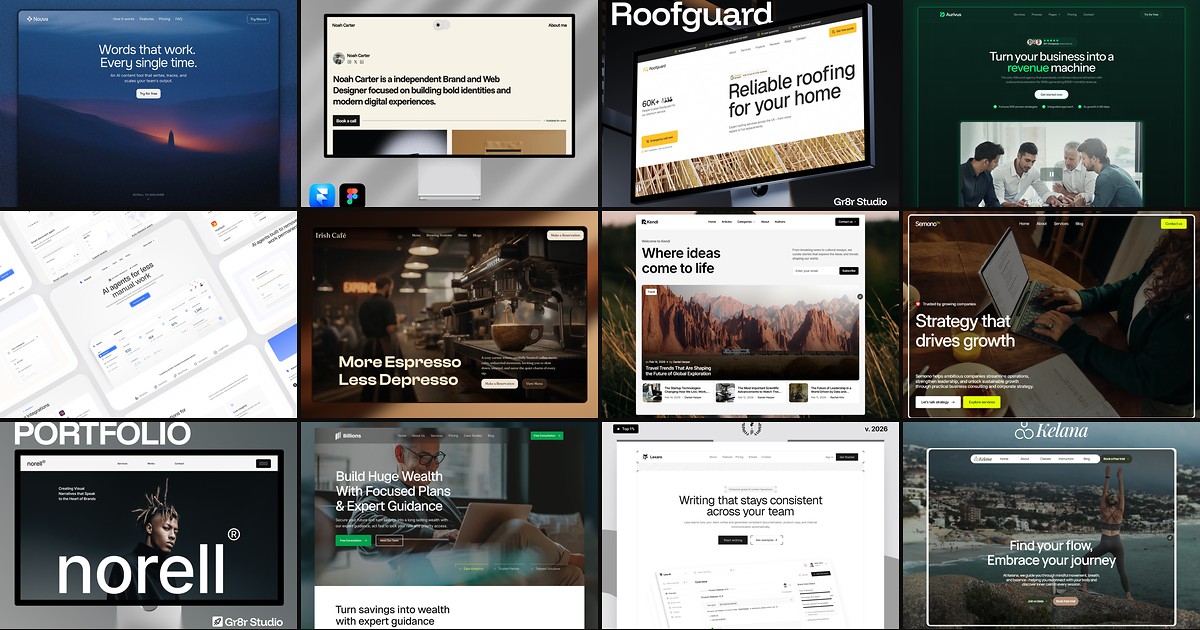
TL;DR: Framer Agent Templates are Marketplace templates that come with skills for Framer’s agent, a design system page and a walkthrough video. Ask the agent for a page the template doesn’t have, run the template’s skill, and the new page should reuse the template’s own styles and components. We counted 401 free ones on November 12, 2026, and 348 ship a skill named
design-system.
Framer now labels a set of Marketplace templates as Agent Templates. The idea is simple: a template shouldn’t stop being useful the moment you need a page it didn’t include. Framer’s guide to creating an Agent Template is written for creators, so this one is for the people remixing them: what you get, how to use it, and what’s actually in the free ones. If you only want the list, our free Framer Agent Templates page has every one we carry.
Framer Agent Templates at a glance
| Regular Framer template | Framer Agent Template | |
|---|---|---|
| The site | Pages, styles, components | Same |
| New pages | Duplicate and edit by hand, or prompt the agent from scratch | Run the template’s skill, and the agent builds with its parts |
| Reference | Whatever you find on the pages | A design system page with every style and component |
| Onboarding | Usually none | A walkthrough video from the creator |
| Page count | More pages is a selling point | Fewer pages is fine, since the agent builds the rest |
That last row is the real shift. Framer’s own example, Sift, has a single home page plus a design system page and one skill. You ask for a careers page or a pricing page and the skill builds it from Sift’s parts.
What’s inside a Framer Agent Template
Skills
A skill is a saved set of instructions the agent follows each time you call it. In an Agent Template the creator has written them for you. The core one usually covers which layout to apply, which color and text styles go where, which components to reuse, and what to leave alone. Others handle repeat jobs: adding a blog post, swapping in your brand, checking SEO before you publish. If skills are new to you, our Framer Agent Skills guide covers how they work in general.
The design system page
One page that shows every color style, text style and component, plus a few example sections. It does two jobs. You use it to see what’s in the file. The agent uses it as the reference for what “on brand” means.
The walkthrough video
A short video where the creator tours the design system page, opens a skill and runs a request or two. It’s worth the few minutes. On yoframer, every Agent Template page embeds the creator’s video right above the write-up.
What we found in 401 free Agent Templates
We pulled every free Agent Template from the Framer Marketplace on November 12, 2026. Here’s what they contain.
| Measure | Result |
|---|---|
| Free Agent Templates | 401 |
With a skill named design-system | 348 |
| Skills per template | 1 to 49, median 4 |
Most common skills after design-system | launch-check (158), rebrand (62), seo-check (55), cms-content (53), personalize (53) |
| Biggest categories | Portfolio (39), SaaS (37), Agency (34), AI (24) |
| Already listed on yoframer | 134 |
Two things stand out. First, skill names aren’t standardized. Plenty of creators prefix theirs with the template name (medio-cms-content, restro-rebrand), so search the list for the job, not the exact word. Second, many Agent Templates are conversions of older templates. 134 of the 401 were already in our directory, and at least three had changed their Marketplace URL along the way, which broke old remix links until we repointed them.
How to use an Agent Template after you remix
- Open the design system page. Learn what the components are called. Asking for “the pricing card” beats asking for “a card”.
- Find the skills under Settings, then Skills. Read the main one. It’s short, and it tells you what the creator expects.
- Run it from the agent chat by typing its command, like
/design-system, then describe the page you want. - Compare the result with an original page. Same buttons, same spacing, same type? Good. If the agent invented something new, that’s a gap in the skill, and skills are editable.
Three workflow recipes to try this week
Add a careers page that matches
You remixed a SaaS or agency template and need a careers page it never shipped with.
- Open the design system page and note the names of the card, button and form components.
- Run the design system skill, then ask for a careers page with three open roles and an application form built from those components.
- Put it next to the home page at the same width and check spacing and type sizes.
- If it made a new button instead of reusing one, add a line to the skill saying which component to use.
Rebrand without breaking the system
The layout is right but the colors, fonts and name are the creator's.
- Look for a rebrand or personalize skill. 115 of the 401 free Agent Templates ship one under one of those two names.
- Give it your brand colors, fonts and company name in one request.
- Check the design system page afterward. Since it shows every style, it is the fastest place to spot one the skill missed.
- Only then start writing real copy.
Run a launch check before you publish
The site is done and you want a last pass before it goes live.
- Run the template's launch-check or seo-check skill if it has one. launch-check alone shows up in 158 of the 401.
- Fix what it flags, especially leftover template copy and empty alt text.
- Read the page titles and meta descriptions yourself. The skill finds gaps, but it does not know your business.
- Publish, then check the live site on a phone.
If you make templates: what Framer asks for
Framer’s guide boils down to a short list, and it’s the same whether you start fresh or convert a template you already published:
- Build on styles and components. Hardcoded colors become color styles, inline text styling becomes text styles, repeated elements become components with variants, and the nav and footer move into a layout template.
- Name things by role, so a skill can point at them. A color called “Text Primary” helps the agent more than one named after its hex value.
- Add the design system page, and keep it current when components change.
- Write a design system skill first, covering page layout, colors, type, components and what to leave alone. Add more skills only for jobs buyers will repeat.
- Test with pages the template doesn’t have, like a careers or pricing page, and tighten the skill until the output is something you’d ship.
- Record a short walkthrough, then submit it to the Marketplace as an Agent Template.
One practical note from our side: if you rename your template’s URL when you convert it, anyone linking to the old URL lands on a dead page. Keep the slug if you can.
Agent Templates worth remixing
These three show the range, from tiny files that lean on the agent to fuller sites with a skill for each content type. Six more picks, and every Agent Template we list, are on the Agent Templates page.
 Live Preview
Nouva · Four pages and fifteen skills
by Kadir
Nouva by Kadir is the clearest example of the small-file idea. It ships four pages (Home, Contact, a CMS legal page and 404) and fifteen skills that build the rest, including add-blog, pricing-and-plans and forms. trim-template goes the other way and strips what you don’t need. Skip it if you want About, Pricing and Blog pages to exist the moment you open the file. Here they’re prompts, not pages.
- Best for
- SaaS founders who would rather prompt the extra pages than delete unused ones
 Live Preview
Noah Carter · A four-skill portfolio you can learn in a minute
by Max
Noah Carter by Max keeps everything small: four pages with projects in the CMS, and four skills that cover the whole life of a portfolio (design-system, add-project, personalize-site, launch-check). You’ll know every command after one look. Skip it if you also need services, pricing or a blog. None ship, and there’s no dedicated skill for adding them.
- Best for
- Designers who want adding a project to be one command
 Live Preview
Roofguard · Trades site with past jobs in the CMS
by Tanjim
Roofguard from Tanjim gives a roofing or trades business nine pages, with past projects and the blog in the CMS. roofguard-cms-content keeps new project entries consistent, and roofguard-copy-voice stops the copy drifting when someone else writes it. Skip it if you need a quote calculator or online booking. The Contact page is the only conversion path.
- Best for
- Roofers and other trades who post finished jobs as proof
Official Framer resources
- How to create an Agent Template, Framer’s step-by-step guide for creators
- Framer Skills, the product page for skills in general
- Sift, Framer’s own Agent Template with one home page and one skill
More reading on yoframer
- Free Framer Agent Templates: six picks, the full grid and how to use them
- Agent Templates in the directory, with category filters
- Framer Agent Skills: how skills work and how to write one
- All Framer updates we’ve covered
The bottom line
Agent Templates change what a good template is. Page count matters less. What matters is whether the styles, components and skills are solid enough that the agent can build the pages you actually need. Judge the design first, then open the skill list. If the main skill is vague, you’ll be doing the agent’s job by hand.
Ready to try one? Pick a template from the free Framer templates hub or the Agent Templates page, and remix it into your Framer account.