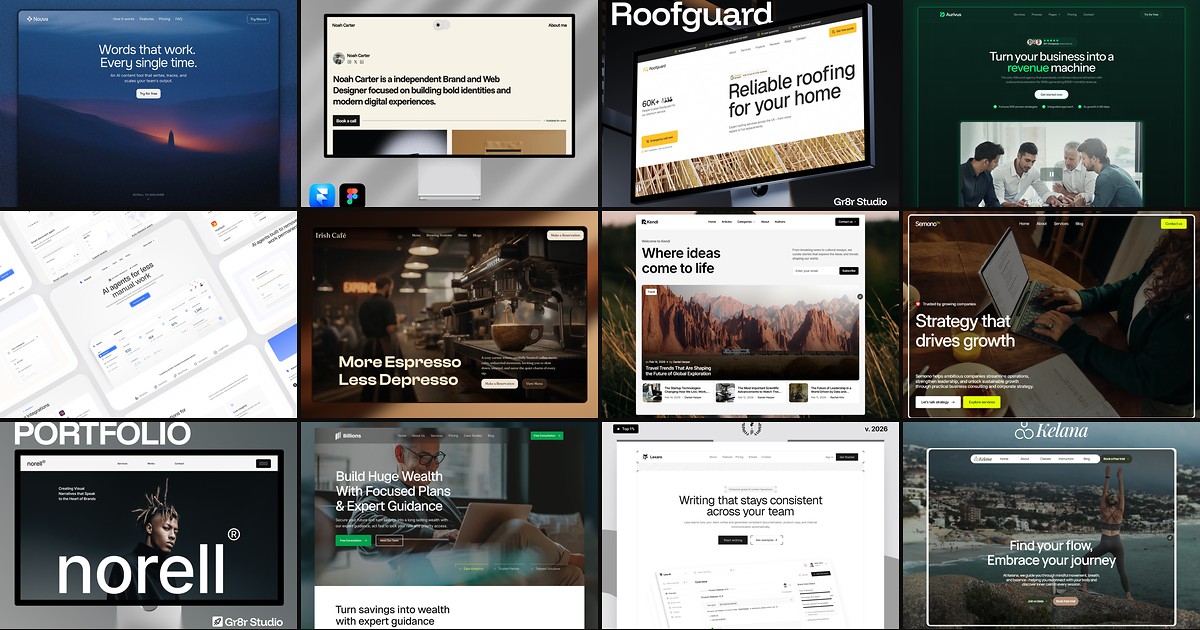
TL;DR — On October 15, 2026, Framer refreshed the Gallery with more categories, vibe filters, a reorganization of existing showcase sites, and a ranking tweak that puts fresher work higher. Use it when you need published-site inspiration before you pick a remix from free Framer templates or the Marketplace.
The Gallery is where Framer shows what real teams shipped, not just what is for sale. Framer’s Community Updates post (scroll to Gallery Refresh) is the canonical source; this yoframer guide translates the release for designers pitching mood boards, agencies auditing competitors, and template authors who want their showcase work discovered again after the category shuffle.
Framer Gallery refresh at a glance
| Area | Before | Gallery refresh (October 15, 2026) |
|---|---|---|
| Categories | Narrower groupings | Expanded category range for browsing |
| Mood search | Mostly manual scrolling | Filter by vibe for look-and-feel |
| Existing sites | Older category placement | Reorganized across the new taxonomy |
| Discovery | Stale favorites could linger | Ranking favors fresh work more often |
| Best for | Casual inspiration | Structured reference before remix or client work |
What’s new in the Framer Gallery refresh
1. Expanded categories
Framer widened the category list so Gallery browsing matches how people actually describe projects (industry, format, and use case overlap less awkwardly). Expect to re-learn where your favorite references live; the point is finer slices, not another endless grid with one label.
2. Vibe filters for look-and-feel
Vibe filters sit on top of categories so you can chase a visual tone (minimal, playful, editorial, and similar buckets Framer exposes in the UI) without opening fifty tabs. This is the headline UX win for mood boards: you filter to a feel, screenshot two or three layouts, then decide whether a free Framer template or a from-scratch canvas pass fits the brief.
3. Reorganized showcase sites
Framer moved existing Gallery sites into the expanded categories. That cleanup helps new visitors, but it can break mental shortcuts for power users. Re-save bookmarks after you confirm where a site landed, especially if you cite Gallery URLs in client decks.
4. Fresher ranking at the top
Framer improved the ranking algorithm so newer showcase work surfaces more often. For creators, that is a nudge to publish fresh sites and keep thumbnails current. For buyers, it means the first screen is less likely to be years-old hero layouts that no longer reflect Framer’s tooling.
How to use Gallery categories and vibe filters
- Open the Framer Gallery from Community navigation (same ecosystem as Marketplace, unified top bar since August 2026).
- Pick an expanded category that matches your project type (marketing site, portfolio, product, and similar labels in the UI).
- Apply a vibe filter that matches the client’s adjective list (“calm,” “loud,” “editorial,” and so on).
- Save three references: one for type hierarchy, one for motion or density, one for mobile rhythm (Gallery sites are published, so breakpoints are honest).
- Switch to execution: search free Framer templates on yoframer or remix from the Marketplace when you need a starting file, not just a screenshot.
- If you sell on Framer, cross-check Marketplace Analytics (September 2025 release on the same Community Updates index) once your own resources go live.
Creator note: Gallery discovery and Marketplace sales are related but not identical. Treat Gallery as top-of-funnel inspiration; treat analytics and template listings as conversion. Read Framer 3.0 Community changes if you have not caught up on the unified Marketplace and Community navigation yet.
Three workflow recipes to try this week
Mood-first client kickoff
The client sent three Dribbble shots and asked for "something like this but Framer." You need legitimate published references, not unattributed mockups.
- Open the Gallery, choose the closest category, then apply a vibe filter that matches the adjectives in the brief.
- Capture three Gallery URLs with notes on typography, section order, and CTA placement.
- Shortlist two remix candidates from /templates/ that share layout DNA, then open Agent chat if you want a quick first pass on copy.
Competitive layout audit
Product marketing wants to know how peers structure pricing and social proof on Framer-hosted sites.
- Filter Gallery by category plus vibe so you compare apples-to-apples visual tone.
- Document repeating patterns (hero depth, logo wall density, FAQ placement) in a shared doc.
- Remix a neutral SaaS starter only after the audit; otherwise you bias toward whatever template you opened first.
Refresh your own showcase presence
You published a Gallery site a year ago and traffic flatlined after the ranking change.
- Republish meaningful design updates so the site qualifies as fresh work under the new algorithm.
- Verify the site landed in the right expanded category after the Framer reorganization pass.
- Link the live site from Marketplace listings and track views in Marketplace Analytics when available.
Framer templates worth Gallery-inspired remixes
Gallery browsing tells you what mood to hit; remixing tells you how fast you can ship. These free templates on yoframer match common Gallery hunts (portfolio density, photography rhythm, one-scroll simplicity). Open the full grid at /templates/ when you need more options.
 Live Preview
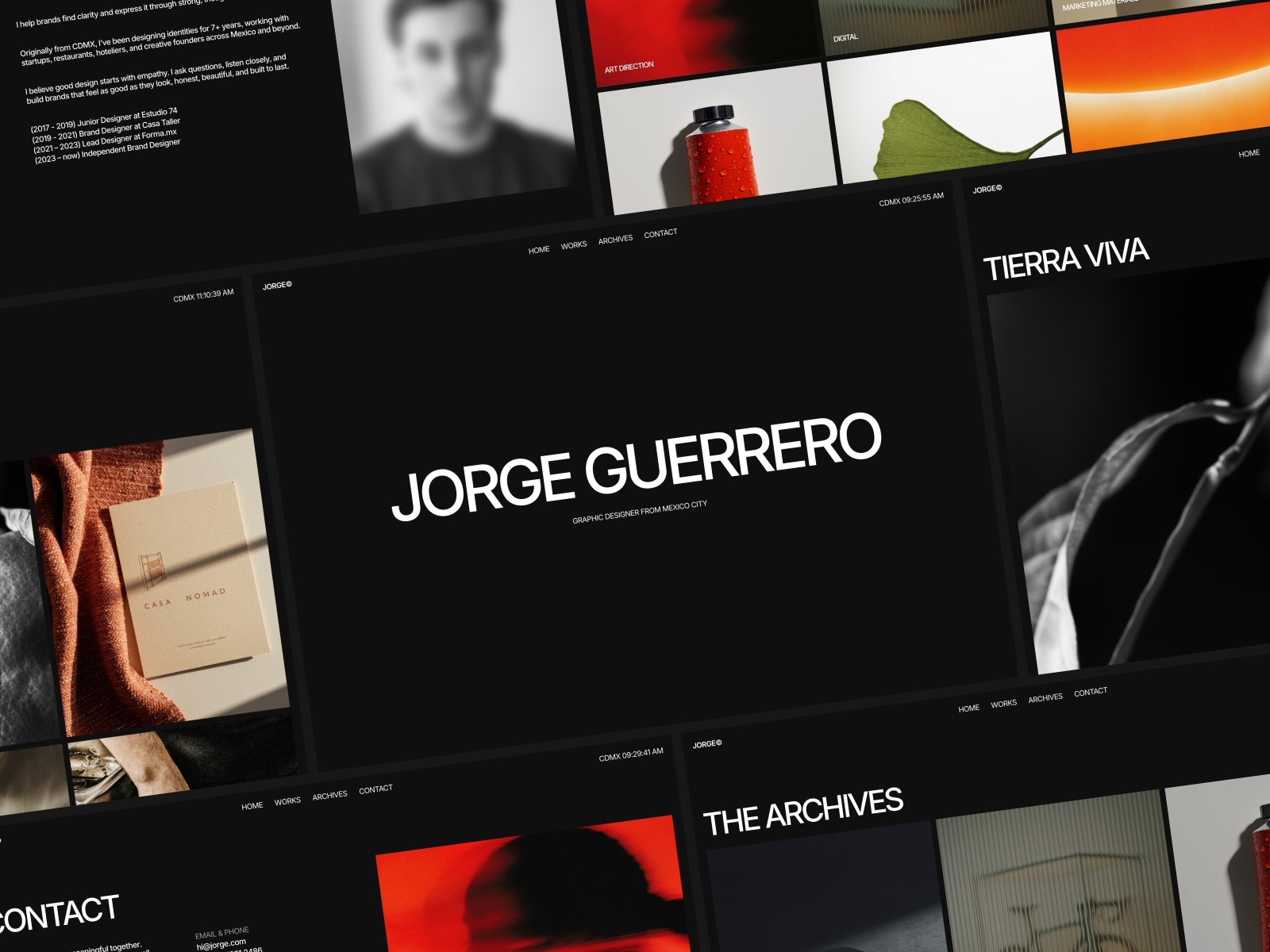
JORGE · Dark portfolio rhythm when Gallery references scream let the work talk.
by Ludovic Losco
JORGE matches the Gallery habit of chasing case-study-first layouts: dark type, breathing room, and CMS hooks for swapping projects after every client win. Remix after you vibe-filter Gallery portfolios so you are copying structure, not pasting someone else’s brand. Weak spot: agency service menus are thin; consultancies may outgrow the sitemap unless they add pages.
- Best for
- Designers who saved minimal portfolio Gallery shots and need CMS project pages underneath.
 Live Preview
Dean · Compact multi-page portfolio when Gallery picks show more than one project depth.
by Dean
Dean ships a tight project map that mirrors how Gallery visitors click into deeper case studies. Use it when your vibe filter surfaces portfolios with disciplined page count, not infinite scroll experiments. Weak spot: large agencies pitching six service lines will feel the ceiling early.
- Best for
- Creators who want project URLs without rebuilding navigation from a one-pager.
 Live Preview
Ferio · One-scroll portfolio when Gallery mood boards stay ultra simple.
by OneFramer
Ferio is the speed remix when Gallery vibes point to single-page portfolios with skills and contact above the fold. Pair it with Gallery screenshots for typography cues, then publish before you over-index on sitemap planning. Weak spot: the day a client asks for nested case-study URLs, you are adding pages manually.
- Best for
- Freelancers who need a live site this week after a fast Gallery inspiration pass.
 Live Preview
SwissBrut · Photography-forward brutalism when Gallery filters skew editorial.
by Swiss
SwissBrut fits high-contrast, image-heavy Gallery trails where vibe filters lean editorial or art-directed. Remix when your saved references rely on photography scale more than SaaS components. Weak spot: copy-heavy B2B teams may fight the aesthetic unless they commit to shorter text blocks.
- Best for
- Visual-led studios translating bold Gallery references into a Framer file.
Official resources and where to go next
- Community Updates Gallery Refresh: canonical October 15, 2026 announcement (Gallery section).
- All Framer updates: platform releases including Firewall and Agent Skills.
- More yoframer Framer Updates: editorial walkthroughs when Framer ships editor, CMS, hosting, or Community changes.
- Full template directory: filter thousands of free remixes after Gallery browsing narrows the mood.
- Submit a template: if you publish free files and want them indexed on yoframer alongside your Marketplace work.
The bottom line
The Gallery refresh is a discovery upgrade, not a canvas feature: categories, vibes, cleaner taxonomy, and fresher ranking help you find published Framer sites that match the brief. Spend fifteen minutes filtering, save honest references, then move to execution with free Framer templates or a blank project in Framer. Your future self will thank you when the client asks why the layout feels intentional instead of generic.