
TL;DR — On June 16, 2026, Framer shipped Framer 3.0 — a platform release centered on canvas-native Agents, Branching for safe team iteration, a rebuilt Community for creators, and External Agents that connect tools like Claude Code and Cursor to your projects. Agents can design pages, write CMS content, build code components, fix accessibility issues, and audit SEO — all on the same canvas you publish from. Branching keeps production clean while Agents and teammates experiment. If you build or maintain client sites in Framer, this is the release that changes daily workflow, not just marketing headlines.
Framer’s official 3.0 announcement frames the shift plainly: AI moves from chat-style prototyping into the production editor. Agents see your layers, CMS collections, styles, and site settings. Branching gives professional teams a merge workflow before anything hits the live domain. The Community relaunch ties Marketplace discovery, social feed, and contests into one creator surface. This article walks through what shipped, how to try it this week, and which yoframer templates are good sandboxes when you want Agents to iterate on real structure.
Framer 3.0 at a glance
| Area | What shipped | Why it matters on real sites |
|---|---|---|
| Agents | AI on the canvas with skills, context, and model choice | Generate pages, fix responsive layouts, manage CMS, write code, audit SEO — without leaving the editor |
| Branching | Isolated branches, staging URLs, auto-branching for Agent edits | Experiment with bold Agent prompts without risking the live site |
| Community | Marketplace, Gallery, Feed, Contests, Members in one home | Creators get visibility and earnings; buyers get better discovery |
| External Agents | Connect Claude Code, Cursor, Codex, and similar tools | Extend existing AI workflows into Framer projects from outside the app |
| Editor design | All-new Framer interface around the above | Faster access to Agents, collaboration, and Community from the same workspace |
Watch Framer’s 3.0 launch walkthrough
Framer live-streamed the launch as Exploring Framer 3.0. The recap below covers Agents on canvas, Branching demos, and the Community reveal — useful if you prefer seeing the editor over reading changelog bullets.
For the written deep dive, Framer’s blog post and event page link to companion articles on AI credits, External Agents, and Marketplace changes.
Agents on the canvas
Framer positions Agents as “Cursor for design” — AI that executes inside the same environment where you inspect, refine, and publish. That distinction matters. Chat-only tools often leave you with screenshots or code snippets you still have to paste and reconcile. Agents operate on your project’s layers, components, CMS rows, color styles, and SEO fields.
What Agents can help with
Based on Framer’s Agents product page and launch materials, common tasks include:
- Layout and pages — generate landing pages, add sections, reorganize heroes, build responsive breakpoints
- Styling — update brand colors, typography scales, button styles, and motion across the site
- CMS — create collections, import CSV or JSON, add fields, populate detail pages
- Content and SEO — rewrite copy, set meta descriptions, add alt text, audit heading hierarchy
- Code components — build accordions, tabbed pricing, custom interactions, and advanced effects
- Quality passes — scan for broken links, accessibility gaps, and inconsistent design tokens
How the Agent UI is organized
Framer’s toolkit centers on a few primitives designers should learn early:
| Tool | What it does |
|---|---|
Skills (/) | Focused slash commands for layout, CMS, styling, components, and code |
| Contexts | Select canvas layers and add them as context to the Agent chat |
Mentions (@) | Reference pages, CMS collections, styles, or assets in a prompt |
| References | Upload images, files, or URLs to steer output toward a reference |
| Chats | Start a new chat per task so context stays focused |
| Models | Choose between Sonnet, Opus, and GPT depending on task complexity |
Because every Agent edit lands on editable canvas layers, you keep human taste in the loop — accept, tweak, or undo before anything publishes.
External Agents
Teams already living in Claude Code, Cursor, Codex, or terminal workflows can connect those tools to Framer projects via External Agents. Examples Framer highlights include importing a Notion changelog into CMS on a schedule, merging a landing page from another project, or updating redirects from a spreadsheet. The point is not to replace in-app Agents — it is to meet teams where they already automate.
Branching for safe iteration
Agents can touch dozens of pages in one session. Without guardrails, that is risky on a client site with a live domain. Branching is Framer’s answer.
From the Collaborate product page:
- Create branches — spin up
update-pricing,agent-hero-redesign, or any isolated copy - Auto-branching — Agent-generated edits can land on a branch while your manual work stays on
main - Branch preview URLs — share
your-branch.framer.appfor client QA without touching production - Changelog — every merge is logged so the team knows what shipped
- Branch-aware cursors — multiplayer editing scopes to the branch you are on
- Merge to main — review diffs, get sign-off, then merge when ready
This is the workflow pattern engineering teams already expect from Git — applied to visual site building. For agencies, it means letting an Agent run a full responsive pass or CMS import on a branch, then walking the client through a staging URL before merge.
The new Framer Community
Framer 3.0 also relaunches Community as the home for creators and buyers. The blog announcement lists:
- Marketplace — templates, components, plugins, and vectors
- Gallery — showcase sites and inspiration
- Awards — recognition for standout work
- Social Feed — follow creators and discover trends
- Members — profiles and reputation
- Contests — structured challenges
Framer states more than 7,000 creators sell through Marketplace and paid out $6.5M to creators in 2025 with no revenue share on creator earnings. A separate Marketplace and Community note explains ranking, reviews, and quality changes — worth reading if you publish templates on yoframer or sell on Framer directly.
For yoframer readers, the Community shift means better discovery paths for free templates we list — and more reason to keep remix links and preview quality high when you submit work.
How to access Framer Agents and Branching
Framer 3.0 ships in the current editor — no separate beta flag for the core features. A practical first-session checklist:
- Open any project in the Framer desktop or web app on a current build.
- Find the Agent entry point — Framer’s redesigned UI surfaces Agents from the canvas; look for the Agent panel or chat affordance in the updated chrome.
- Start small — select one hero frame as context, ask the Agent to tighten mobile spacing, and inspect every layer change before accepting.
- Create a branch — before a large prompt (full responsive pass, CMS import), branch off
mainso production stays untouched. - Share the branch preview — send the staging URL to a teammate or client for review.
- Merge or discard — merge approved work to
main, publish when ready.
If you rely on External Agents, follow Framer’s developer docs to authenticate your tool and scope project access.
Three workflow recipes to try this week
Responsive pass on a branch
You have a marketing site that looks fine on desktop but breaks on tablet. You want an Agent to fix breakpoints without risking the live homepage.
- Open the project and create a branch named something like responsive-audit.
- Select the worst-behaving page frames as Agent context.
- Prompt: "Make this page responsive — stack columns on mobile, fix hero text size, collapse nav to hamburger below 810px."
- Review every breakpoint change on the branch preview URL before merging to main.
CMS blog import with an Agent
You are migrating a client blog from a spreadsheet or old WordPress export into Framer CMS.
- Ensure a Blog collection exists with Title, Slug, Date, Featured Image, and Body fields.
- Upload the CSV or JSON as a Reference in the Agent chat.
- Prompt: "Import this file into the Blog collection and map columns to the correct fields."
- Spot-check five posts in CMS 3.0 table view, then connect detail pages if the Agent did not already.
Client review loop with staging
An agency wants the client to approve a pricing redesign before it goes live.
- Branch from main and ask the Agent (or a designer) to rebuild the pricing section.
- Share the branch preview URL in your client channel — production URL stays unchanged.
- Collect comments on canvas or in your PM tool, iterate on the branch.
- Merge to main and publish only after written approval.
Who benefits most
- Agency teams juggling client sites who need safe experimentation and faster first drafts
- Solo founders who want to ship landing pages and CMS blogs without hiring for every copy pass
- Framer creators selling templates and components in the rebuilt Community
- Developers who already use Cursor or Claude Code and want those workflows to touch Framer projects
- Content-heavy sites where Agents plus CMS 3.0 table editing compound editorial speed
Framer templates to stress-test with Agents
These picks give Agents real pages and CMS structure to work with — better than an empty file when you are learning slash skills and branch merges. Browse the full yoframer template directory for more niches.
 Live Preview
ERPSAA · Sixteen-route SaaS file with CMS blog and integrations
by Gr8r
ERPSAA ships a full SaaS sitemap — home, pricing, features, blog, careers, and integration detail pages with CMS hooks. Remix it when you want an Agent to practice multi-page edits and collection-aware prompts on a credible marketing shell.
- Best for
- Teams who want Agents to iterate on pricing, features, and CMS-backed blog posts in one project
 Live Preview
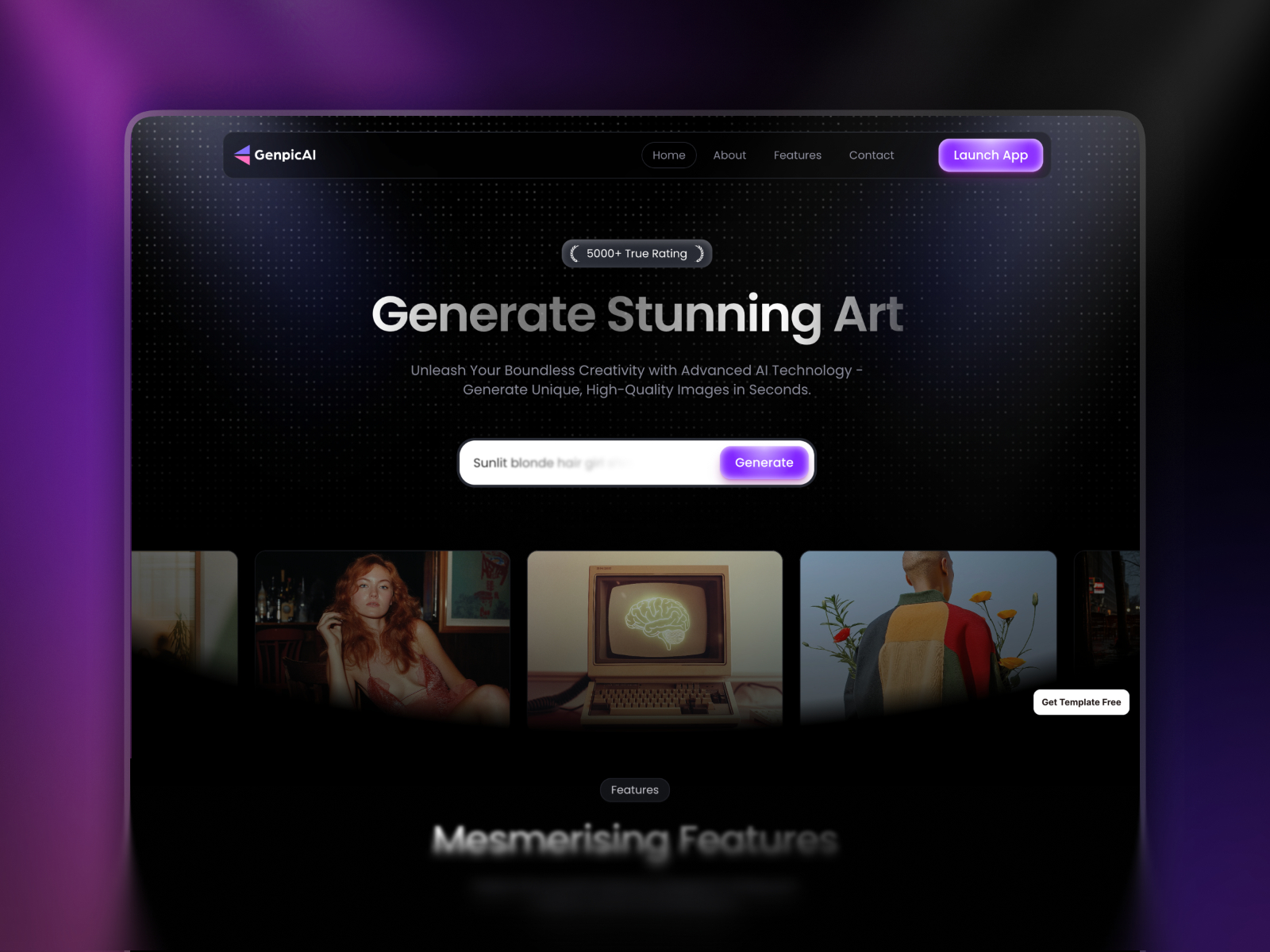
GenpicAI · AI product positioning in six focused pages
by Jitu
GenpicAI is lean on page count but strong on AI SaaS positioning — home, features, pricing, about, and contact. A good sandbox for Agent prompts around copy refreshes, brand color swaps, and hero layout variants without navigating a huge sitemap.
- Best for
- Founders launching an AI tool who need a tight landing narrative Agents can rewrite and re-style quickly
 Live Preview
Genesy · Agency site with blog and waitlist routes
by Marso
Genesy targets agency positioning with blog and waitlist pages — realistic structure for an Agent-driven content pass or section reorder on a branch. Pair it with Branching when you are testing bold layout prompts for a client pitch.
- Best for
- Studios that want Agents to rebuild service sections or blog indexes on a branch before client review
For more curated sets, see Framer template roundups — the best free SaaS Framer templates in 2026 list overlaps well with AI-forward starters.
Official Framer resources worth bookmarking
- Official Framer 3.0 release notes — canonical announcement.
- Introducing Framer 3.0 blog post — narrative from Koen Bok and Jorn van Dijk.
- Framer Agents product page — task examples and UI primitives.
- Collaborate and Branching — branching, staging, and merge workflow.
- External Agents docs — connect Claude Code, Cursor, and similar tools.
- AI credits and pricing note — plan changes tied to the 3.0 launch.
- All Framer updates — everything else shipping around the same window.
More reading on yoframer
- Framer updates hub — editorial coverage of each major Framer release.
- Framer CMS 3.0 deep dive — table editing and folders Agents can also manage.
- Resources directory — components, plugins, kits, and tutorials.
- Submit a template or resource — if you ship something that shows off Agent-friendly structure.
The bottom line
Framer 3.0 is not a incremental toolbar polish — it is a bet that website work moves onto Agent-assisted canvas workflows the same way engineering moved onto AI-assisted IDEs. Agents handle execution; you keep judgment. Branching makes that safe for client work. The Community relaunch rewards creators who already treat Framer as a distribution channel.
Open a real project this week, branch before your first ambitious prompt, and run one focused task — a responsive fix, a CMS import, or a pricing section rebuild. If the staging URL review loop feels natural, you will know why this release matters more than any single feature bullet.