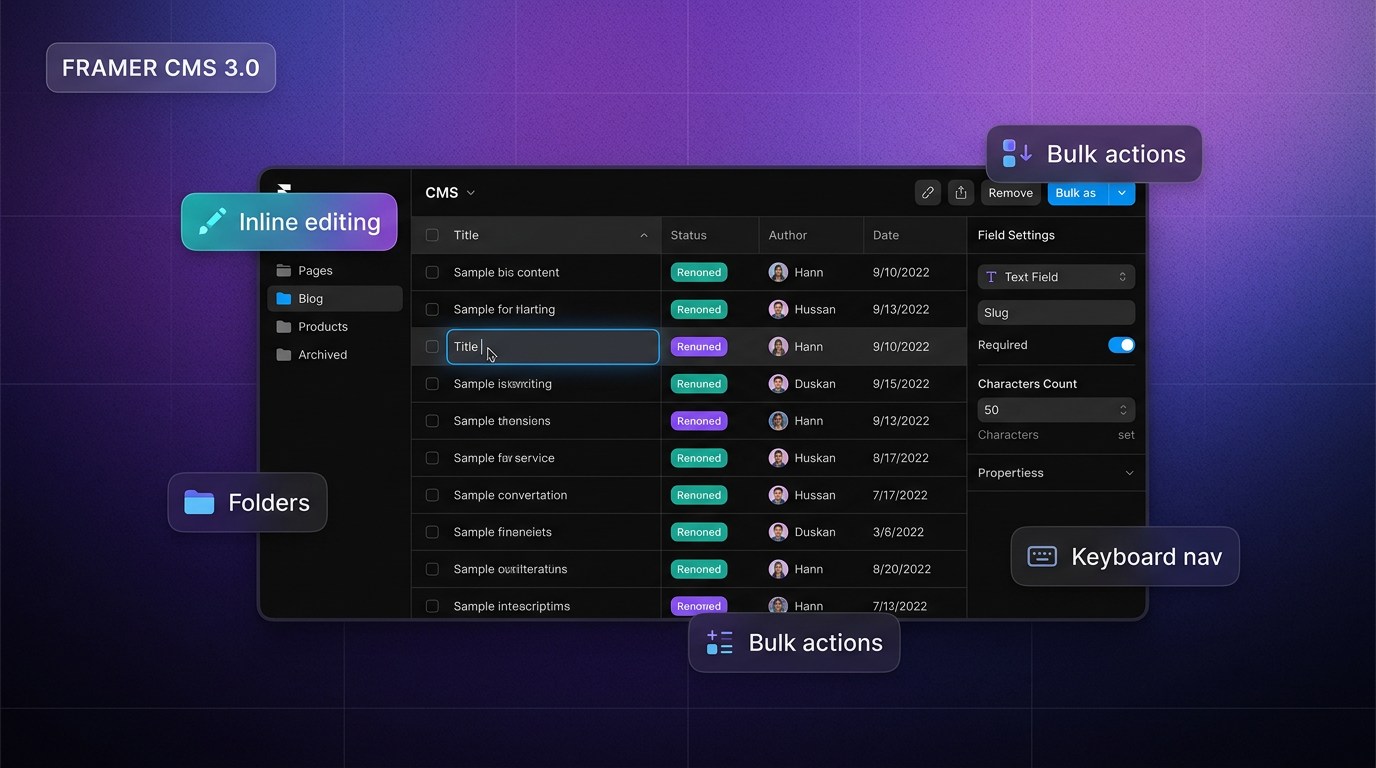
TL;DR — On April 21, 2026, Framer shipped CMS 3.0, a full redesign of the Content Management System. The table now supports inline editing on every cell, multi-cell selection and bulk actions, folders for collections, resizable and reorderable columns, filtering combined with search, a dedicated fields panel, and a rebuilt keyboard navigation model. If you manage a blog, a portfolio, a team page, or any CMS-driven section inside a Framer site, this is the most practical workflow upgrade on the platform in 2026.
Framer shipped CMS 3.0 on April 21, 2026 — a ground-up redesign of how content collections are managed in the editor. If you run a blog, portfolio cases, team pages, a changelog, a jobs board, or any other CMS-driven section, Framer CMS 3.0 is the biggest day-to-day workflow change Framer has shipped this year.
Framer’s own CMS product page describes the CMS as a database baked into the canvas. CMS 3.0 is what happens when that database finally gets a proper editor. This write-up covers what actually changed, why it matters, how to use the new table view with shortcuts, and which CMS-ready Framer templates pair best with it.
CMS 3.0 at a glance
| Area | Before (CMS 2.x) | Framer CMS 3.0 |
|---|---|---|
| Editing cells | Open overlay for most fields | Inline editing on statuses, toggles, refs, media, colors |
| Bulk edits | Limited, slow at scale | Multi-cell selection, bulk actions, copy and paste |
| Structure | Flat list of collections | Folders for collections |
| Finding items | Basic search | Filters + search, composable |
| Columns | Fixed layout | Resize, reorder, customize |
| Schema | Fields inline with the list | Dedicated fields panel |
| Keyboard | Patchy | Rebuilt from scratch |
| Draft vs live | Easy to misread | Clearer status cues |
What’s new in Framer CMS 3.0
1. Inline editing across every cell
In CMS 2.x, most edits meant opening an overlay panel — fine for a single post, punishing when you are touching a hundred rows. In CMS 3.0, the table is the workspace. Click a cell and edit in place for statuses, toggles, references, images, icons, and colors. Rich text and long content still expand into a comfortable overlay, but the point-and-shoot stuff now lives where you expect it.
This is the change you will feel first. Editorial calendars, job boards, glossaries, multilingual blog queues, and any large CMS collection benefit immediately. If you already treat Framer’s CMS like a spreadsheet, the editor finally matches the mental model.
2. A dedicated panel for managing fields
Field definitions have been lifted out of the table chrome into their own panel. You get more space, a cleaner UI, and fewer accidental schema changes when you meant to edit content. Renaming fields, changing types, adjusting warnings, and adding new fields now happen in a calm, focused view — a real win for teams where a designer owns the schema and an editor owns the content.
3. Folders for CMS collections
Collections can now be organised into folders. If your site mixes blog posts, changelog entries, legal pages, team members, FAQ items, and product features, folders turn the CMS list from a flat dump into a navigable tree. On any real-world site with more than three or four collections, this is the difference between an editor that scales and one that gets abandoned.
4. Filtering, search, and custom columns
Search now composes with filters, so you can filter down to a locale or a status and then search within that subset. Columns can be resized, reordered, and hidden, which means the table can actually match how you work — hide metadata you never touch, pull status forward during a publishing pass, widen rich-text columns during a copy edit.
5. Multi-cell selection and bulk actions
Select a range of cells. Change their status in one pass. Copy a block of data and paste it into another collection. Bulk tag, bulk set references, bulk update authorship after a rename. The heavy lifting that used to require a script or a very patient afternoon is now a standard editor interaction.
6. Rebuilt keyboard navigation
Keyboard nav was re-engineered from the ground up. Arrow keys, enter, and escape behave predictably across every cell type, which matters more than it sounds: CMS operators live in the keyboard, and the old inconsistencies punished exactly the people who used CMS the most.
7. Polish that adds up
Field dividers, the item overlay layout, status clarity, link field editing, field warnings, the add-field menu — all cleaned up. On the fix side: slow bulk editing across multiple fields, inconsistencies when editing media, and sluggish field removal have been addressed.
Full CMS 3.0 changelog, annotated
Framer’s own changelog keeps this brief. Here’s the same list with context:
| Type | Change | Why it matters |
|---|---|---|
| Added | Inline editing across all CMS table cells | Headline change. Kills overlays for day-to-day edits. |
| Added | Dedicated panel for managing fields | Schema changes are less likely to slip in during content edits. |
| Added | Multi-cell selection and bulk actions | Spreadsheet-grade editing for large collections. |
| Added | Folder support for CMS collections | Scales sites with many collection types (blog, legal, team, changelog). |
| Added | Filtering on items in the table view | Combined with search, makes large collections navigable. |
| Added | Column resizing and reordering | Customise the table to match the task you’re on. |
| Improved | Rows multi-selection and bulk actions | Faster, more predictable selection. |
| Improved | Search combined with active filters | No more resetting filters just to search. |
| Improved | Keyboard navigation across the CMS | CMS power users benefit most. |
| Improved | Field dividers with and without titles | Small, but makes schema panels readable. |
| Improved | Item overlay layout and fields | Overlays stay for long content, now better organised. |
| Improved | Clarity of draft and live statuses | Fewer “is this live?” mistakes. |
| Improved | Editing link fields in the overlay | Less friction on link-heavy content (docs, directories). |
| Improved | Field warnings across all fields | Schema issues surface before they ship. |
| Improved | Menu to add new fields | Quicker schema edits. |
| Fixed | Slow bulk editing across multiple fields | Bulk actions feel instant now. |
| Fixed | Inconsistencies in editing media fields | Media cells behave like every other cell. |
| Fixed | Removing fields in use being too slow | Schema refactors don’t stall the editor. |
How to access CMS 3.0
CMS 3.0 is live for all Framer users on current builds — no beta flag, no Pro plan requirement for the core editing experience. If you’re still wondering about plans, the authoritative list is on Framer’s pricing page.
To try it in 30 seconds:
- Open any Framer project in the editor (web app or Mac / Windows desktop app).
- Click CMS in the left sidebar.
- Pick a collection (create one if the project is new).
- Click directly into any cell — for example a status chip — and edit inline.
- Hold Shift and click to select a range of cells; try a bulk action.
- Right-click the collection list in the sidebar and create a folder to group related collections.
- Drag a column header to reorder; drag its edge to resize.
If you don’t have a Framer account yet, you can get started free on Framer → and land on the CMS 3.0 editor from day one.
Three workflow recipes to try this week
Reading about the new CMS is one thing. Here’s how it actually speeds up real work.
The Monday blog triage
You have 40 blog posts, 12 of them drafts, 5 needing author changes, 3 scheduled wrong.
- Open the Blog collection. Add a Status filter for Draft.
- Reorder columns so Status, Author, Date, and Title are the first four.
- Select the rows that should go live this week. Bulk edit status to Live.
- Select the author cells for the five posts you need to reassign. Paste the new author reference into the selection.
- Done — without opening a single overlay.
Splitting a mixed CMS into folders
Your site started as a blog and grew into a blog plus legal pages, changelog, team, and FAQ in one flat list.
- Create folders: Marketing, Content, Legal, Internal.
- Drag collections into the folder that actually describes them.
- Revisit field schemas in the fields panel — decide in seconds whether Team needs a long bio field instead of debating it in Slack.
Prepping a multilingual site
You are about to turn on Auto Translate on a site with 60 blog posts (see https://www.framer.com/updates/auto-translate).
- In Blog, filter to Published.
- Sort by Updated, pick the 20 most recent rows.
- Bulk set a new locale ready toggle field on that slice.
- Hand the rest to Auto Translate so older posts catch up without row-by-row work.
Keyboard cheat sheet
The exact shortcuts may evolve with future CMS 3.0 patches — these match the rebuilt keyboard model at launch:
| Action | Shortcut (Mac) | Shortcut (Windows) |
|---|---|---|
| Move between cells | Arrow keys | Arrow keys |
| Edit the active cell | Enter | Enter |
| Leave edit mode | Esc | Esc |
| Extend selection | Shift + Arrow | Shift + Arrow |
| Select full row | Shift + Click | Shift + Click |
| Copy / Paste cell | ⌘ C / ⌘ V | Ctrl + C / V |
| Undo / Redo | ⌘ Z / ⇧⌘ Z | Ctrl + Z / Y |
For the definitive list, check Framer’s help center after your next editor update.
Who benefits most from CMS 3.0
- Solo founders running a marketing site, a blog, and a changelog out of one Framer project.
- Content teams publishing multiple posts per week across locales.
- Agencies handing CMS keys to clients who are not designers.
- Portfolio designers with dozens of case studies and messy legacy field names.
- Documentation builders using Framer for a docs site or glossary.
If a person on your team has ever opened the CMS, winced, and said “can’t I just edit this like a spreadsheet?” — CMS 3.0 is what they have been asking for.
Framer templates built to scale with CMS 3.0
Starting from a template that already defines collections saves hours of schema work and gives you real rows to stress-test the new table view immediately. These picks come from the yoframer templates directory — every remix link uses utm_medium=updates plus our Framer partner tag so you support editorial coverage like this post at no cost to you.
 Live Preview
Revior · Free SaaS layout with a CMS-ready blog
by OneFramer
A bright, modern, 5-page SaaS layout — Home, About, Feature, Pricing, Blog — with a CMS-powered blog and a layout structure that survives your brand colors. The strongest default pick when you want to feel CMS 3.0 on real blog rows on day one.
- Best for
- Early-stage SaaS and AI founders shipping a marketing site in a weekend
 Live Preview
Bizent · Four CMS collections out of the box
by OneFramer
Nine pages, CMS-driven projects, services, team, and blog sections, and a polished corporate-but-warm aesthetic. Bizent is the rare free template where you can actually exercise bulk actions and folders without inventing collections first.
- Best for
- Consultancies and service businesses that publish projects, services, team, and blog content from the CMS
 Live Preview
Arcadia · Agency depth with CMS case studies
by OneFramer
Agency-grade structure, CMS-ready case studies, and richer layouts if you need more depth than a simple marketing site. A good fit if CMS 3.0’s folders will genuinely earn their keep on your project.
- Best for
- Agencies and studios that need portfolio structure beyond a single blog collection
Want more curated lists built with CMS in mind? Start with these yoframer roundups:
- 10 best free SaaS Framer templates in 2026
- Best agency Framer templates in 2026
- Best portfolio Framer templates in 2026
- Best startup Framer templates in 2026
Official Framer resources worth bookmarking
- Framer CMS 3.0 release notes — the source for every changelog entry quoted above.
- Framer CMS product page — evergreen overview of what the CMS is and isn’t.
- All Framer updates — latest platform and editor changes.
- Framer developers changelog — API and developer-facing changes.
- Framer help center — official how-tos and troubleshooting.
- Framer on YouTube — video walkthroughs of recent releases, including CMS and editor updates.
- Framer pricing — plan matrix, since some CMS-adjacent features (publishing scale, staging, team seats) are plan-dependent.
More reading on yoframer
- Browse every CMS-ready listing in the Framer templates directory.
- Discover kits, plugins, and tutorials in the yoframer Resources hub.
- Compare curated Framer template roundups by niche.
- Have a template, component, or plugin to feature? Submit it to yoframer.
The bottom line
Framer CMS 3.0 is not a flashy release — there are no new visual primitives, no new publishing targets, no new AI features layered on top. It is something rarer and more valuable: a release about removing friction for the people who actually use the tool every day. Inline editing, folders, real filters, real keyboard support, and a proper fields panel are the kind of upgrades that quietly change how much content your site can carry before it starts to feel heavy.
If you already run a CMS-driven site in Framer, open it this week and do a real content pass. If you’re starting fresh, remix one of the CMS-ready templates above, fill the tables with real rows, and feel the new editor under load. And if Framer isn’t in your stack yet — this is a good week to try it.